Un arresto del FBI demuestra que ni Steam ni las plataformas oficiales son infalibles
Agosto 5, 2026Provide more clear, contextual feedback with timestamped comments in Google Drive videos
Agosto 7, 2026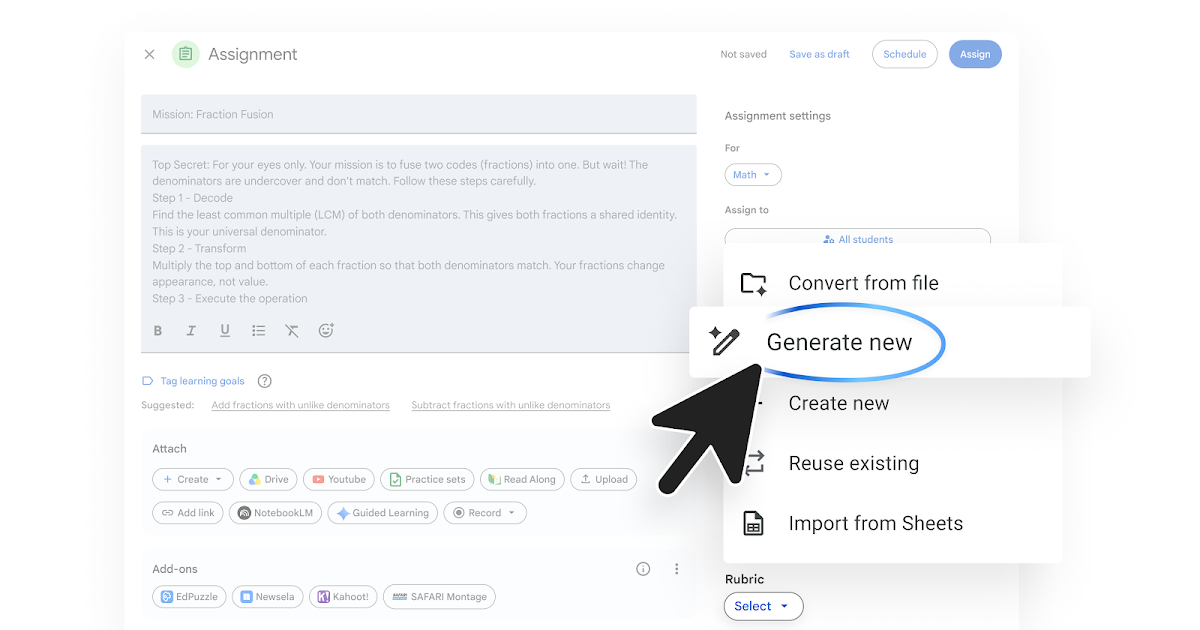
To make it easier to create rubrics and grade in Google Classroom, educators can now instantly generate a new Classroom-ready rubric during their assignment creation workflow, using context from their assignment.
With this update, there will now be multiple ways to create and use rubrics in Classroom:
- [New] Draft relevant Classroom rubrics from the assignment creation page: Within the “Rubrics” section, generate a new Classroom-ready rubric with help from Gemini based on their assignment. Educators can review and edit the proposed rubric criteria before adding it to the assignment, saving valuable prep time.
- Convert existing rubrics files from the assignment creation page: Within the “Rubrics” section, educators can select an existing rubric they have and instantly convert it to a Classroom-ready rubric.
- Create rubric files from the Gemini tab: When planning their lessons, educators can collaborate with Gemini to draft a rubric based on information that they provide. They can then export the rubric to Sheets or Docs before attaching it to their class.
Note: This feature is only available for users over age 18.
 |
| Streamline grading setup by instantly generating custom rubrics directly within the assignment creation workflow. |
Getting started
- Admins: This feature will be available by default if Gemini in Classroom is enabled. Visit the Help Center to learn more about managing access to Gemini in Classroom.
- End users: Visit the Help Center to learn more about creating and reusing rubrics for an assignment.
Rollout pace
- Rapid Release and Scheduled Release domains: Full rollout (1–3 days for feature visibility) starting on August 5, 2026
Availability
- Education: Education Fundamentals, Standard, and Plus
Resources
- Google Classroom Help: Create or reuse a rubric for an assignment
- Google Workspace Admin Help: Manage access to Gemini in Classroom